Aufschlüsselung der Aktivitäten
Haben Sie Ihre Daten im Blick – von zusammenfassenden Gesamtübersichten bis hin zu Details einzelner Transaktionen.
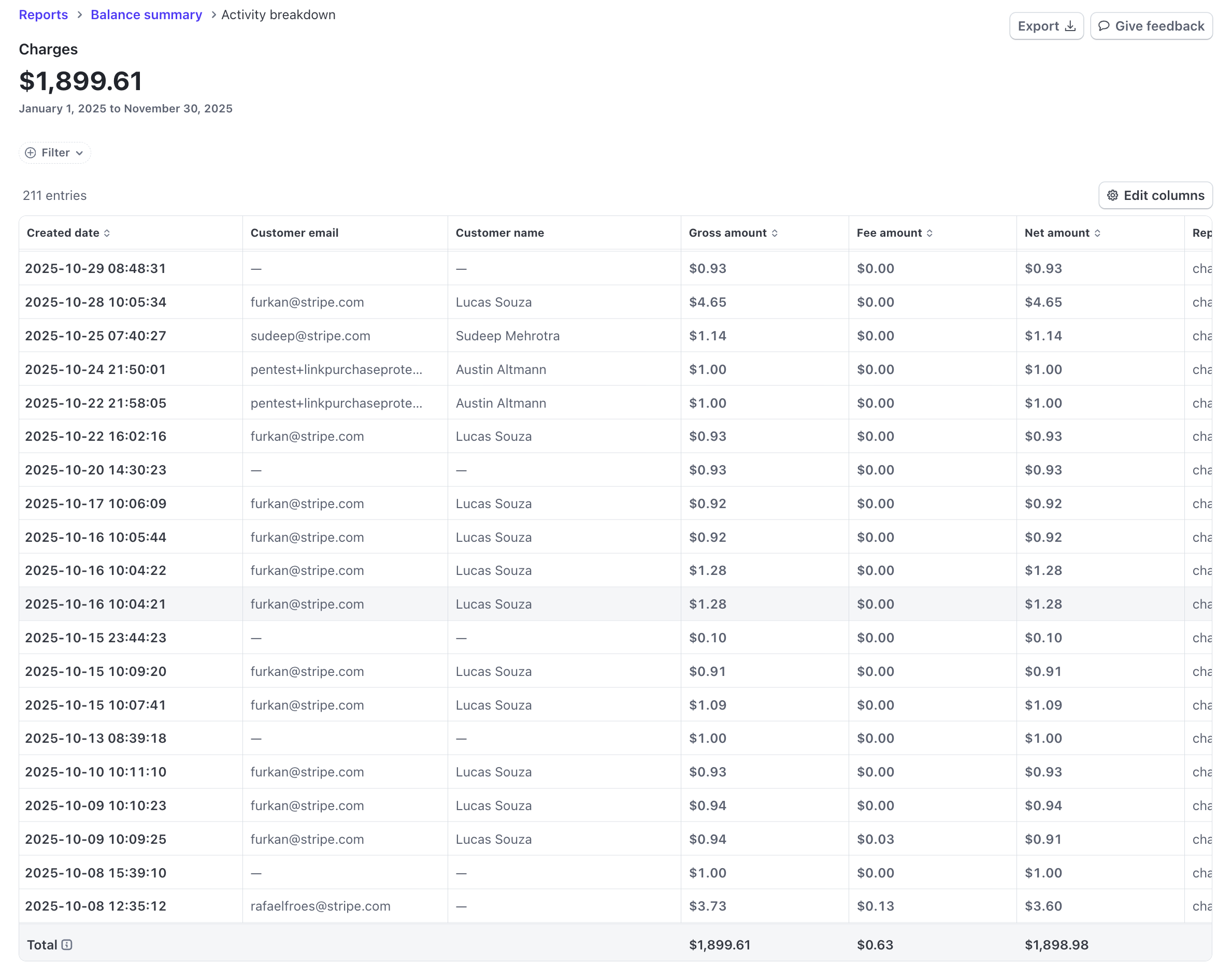
Überwachen Sie Ihre Finanzberichtsdaten – von zusammenfassenden Gesamtübersichten bis hin zu Details einzelner Transaktionen im Stripe-Dashboard. Filtern und analysieren Sie Transaktionen, anstatt CSV-Dateien herunterzuladen. Die Aufschlüsselung der Aktivitäten können Sie für folgende Zwecke verwenden:
- Transaktionsabgleich: Verstehen Sie die spezifischen Transaktionen, die zu den Gesamtsummen beitragen.
- Auditvorbereitung: Bereitstellung einer detaillierten Transaktionshistorie für Abrechnungszeiträume.
- Kunden-Analyse: Analysieren Sie Zahlungsmuster und Aktivitäten für bestimmte Kundinnen und Kunden.
- Finanzielle Berichterstattung: Unterstützen Sie detaillierte Finanzanalysen und Berichtsanforderungen.
Bevor Sie loslegen
Eine Aktivitätsaufschlüsselung ist nur für Plattformkonto-Berichte verfügbar.
Aufschlüsselung der Zugriffsaktivitäten
Greifen Sie auf die Aufschlüsselung der Zugriffsaktivitäten zu, indem Sie auf Beträge in den folgenden Berichten klicken, um die zugrunde liegenden Transaktionen zu überprüfen, die Auswirkungen auf die Kontostände und -änderungen haben:
- Saldenübersicht: Klicken Sie auf Beträge im Bereich Saldoänderung durch Aktivität.
- Auszahlungsabgleich: Klicken Sie auf Beträge in den Bereichen Auszahlungsabgleich und Abgleich des Endguthabens.
Die Aktivitätsübersicht übernimmt automatisch den Datumsbereich und die Währung aus dem Bericht, von dem aus Sie navigieren.
Schlüsselfunktionen
Die folgenden Funktionen in der Aktivitätsaufschlüsselung helfen Ihnen bei der Analyse Ihrer Transaktionsdaten.
Filter
Filtern Sie Aktivitäten auf Transaktionsebene, um Ihre Analyse auf bestimmte Datenteilmengen zu fokussieren:
- Kunde/Kundin: Konzentrieren Sie sich auf Aktivitäten bestimmter Kundinnen und Kunden, indem Sie die Suchfunktion verwenden, um sie nach Name, E-Mail-Adresse oder ID zu finden.
- Zahlungsmethode: Filtern Sie nach Art der Zahlungsmethode, um Transaktionen anhand der Zahlungsweise der Kundinnen und Kunden zu analysieren.
- Land: Sehen Sie sich Transaktionen aus bestimmten Ländern an, um geografische Zahlungsmuster zu verstehen.
- Produkte: Analysieren Sie Aktivitäten für bestimmte Produkte oder Dienstleistungen, um produktspezifische Transaktionsmuster zu verstehen.
Exportieren
Laden Sie detaillierte Berichte im CSV-Format herunter. Auch wenn die Seitenaufteilung die Anzeige einschränkt, enthält der Export dennoch den vollständigen Datensatz.
- Klicken Sie auf Herunterladen, um die gefilterten Daten als CSV-Datei zu exportieren.
- Der Export enthält alle Transaktionen, die mit Ihren aktuellen Filtern übereinstimmen, nicht nur die sichtbare Seite.
Spalten anpassen
Passen Sie mit Spalten bearbeiten an, welche Spalten in Ihrer Ansicht angezeigt werden. Ihre Spaltenpräferenzen gelten für die Bildschirmansicht. Für Exporte ist die Spaltenauswahl ähnlich wie bei detaillierten Berichten möglich.
Verfügbare Spalten
Die verfügbaren Spalten variieren je nach ausgewähltem Bericht.
Balance change from activity drilldown
| Spaltenname | Standard | Beschreibung |
|---|---|---|
| amount | Gross amount of the transaction in major currency units | |
| automatic_transfer_id | ID of the automatically created payout associated with this transaction | |
| available_on | The date the transaction’s net funds will become available in the Stripe balance | |
| balance_transaction_id | Unique identifier for the balance transaction | |
| card_country | Two-letter ISO code representing the country of the card | |
| country | Country of transaction for both card and non-card payments | |
| created | Time at which the balance transaction was created in the requested timezone | |
| currency | Three-letter ISO currency code | |
| customer_email | Email address of the customer associated with this transaction | |
| customer_id | The unique ID of the related customer, if any | |
| customer_name | Name of the customer associated with this transaction | |
| description | Description attached to the balance transaction | |
| fee | Fees paid for this transaction in major currency units | |
| invoice_id | Unique ID for the associated invoice, if any | |
| net | Net amount of the transaction in major currency units | |
| payment_intent_id | The unique ID of the related Payment Intent, if any | |
| payment_method_type | The type of payment method used in the related payment | |
| product_ids | List of product IDs associated with this balance transaction. | |
| product_names | List of product names associated with this balance transaction. | |
| reporting_category | Categorization of the balance transaction | |
| source_id | The Stripe object to which this transaction is related |
Payout reconciliation drilldown
| Spaltenname | Standard | Beschreibung |
|---|---|---|
| amount | Gross amount of the transaction in major currency units | |
| automatic_transfer_id | ID of the automatically created payout associated with this transaction | |
| available_on | The date the transaction’s net funds will become available in the Stripe balance | |
| balance_transaction_id | Unique identifier for the balance transaction | |
| card_country | Two-letter ISO code representing the country of the card | |
| country | Country of transaction for both card and non-card payments | |
| created | Time at which the balance transaction was created in the requested timezone | |
| currency | Three-letter ISO currency code | |
| customer_email | Email address of the customer associated with this transaction | |
| customer_id | The unique ID of the related customer, if any | |
| customer_name | Name of the customer associated with this transaction | |
| description | Description attached to the balance transaction | |
| fee | Fees paid for this transaction in major currency units | |
| invoice_id | Unique ID for the associated invoice, if any | |
| net | Net amount of the transaction in major currency units | |
| payment_intent_id | The unique ID of the related Payment Intent, if any | |
| payment_method_type | The type of payment method used in the related payment | |
| product_ids | List of product IDs associated with this balance transaction. | |
| product_names | List of product names associated with this balance transaction. | |
| reporting_category | Categorization of the balance transaction | |
| source_id | The Stripe object to which this transaction is related |
Ending balance drilldown
| Spaltenname | Standard | Beschreibung |
|---|---|---|
| amount | Gross amount of the transaction in major currency units | |
| automatic_transfer_id | ID of the automatically created payout associated with this transaction | |
| available_on | The date the transaction’s net funds will become available in the Stripe balance | |
| balance_transaction_id | Unique identifier for the balance transaction | |
| card_country | Two-letter ISO code representing the country of the card | |
| country | Country of transaction for both card and non-card payments | |
| created | Time at which the balance transaction was created in the requested timezone | |
| currency | Three-letter ISO currency code | |
| customer_email | Email address of the customer associated with this transaction | |
| customer_id | The unique ID of the related customer, if any | |
| customer_name | Name of the customer associated with this transaction | |
| description | Description attached to the balance transaction | |
| fee | Fees paid for this transaction in major currency units | |
| invoice_id | Unique ID for the associated invoice, if any | |
| net | Net amount of the transaction in major currency units | |
| payment_intent_id | The unique ID of the related Payment Intent, if any | |
| payment_method_type | The type of payment method used in the related payment | |
| product_ids | List of product IDs associated with this balance transaction. | |
| product_names | List of product names associated with this balance transaction. | |
| reporting_category | Categorization of the balance transaction | |
| source_id | The Stripe object to which this transaction is related |
Feedback und Verbesserungsvorschläge
Klicken Sie Feedback geben in der Aktivitätsaufschlüsselung, um Ihre Meinung mitzuteilen und Verbesserungen vorzuschlagen. Ihr Feedback hilft uns, Funktionalität und Benutzerfreundlichkeit zu verbessern und Funktionen hinzuzufügen, die Ihre Abstimmungs- und Analyse-Workflows unterstützen.
Integration in andere Berichte
Die Aktivitätsaufschlüsselung ist in andere Finanzberichte integriert. Verwenden Sie die Breadcrumb-Navigation, um den Kontext beizubehalten, während Sie Ihren Analyse-Workflow durchlaufen.
- Saldenübersicht: Zugriff auf die Aktivitätsaufschlüsselung aus den Abschnitten Saldoänderung und Auszahlung.
- Auszahlungsabgleich: Zugriff auf die Aktivitätsaufschlüsselung aus den Abschnitten Auszahlung und Endguthaben.