# Create separate charges and transfers
Create charges on your platform account and transfer funds to multiple connected accounts.
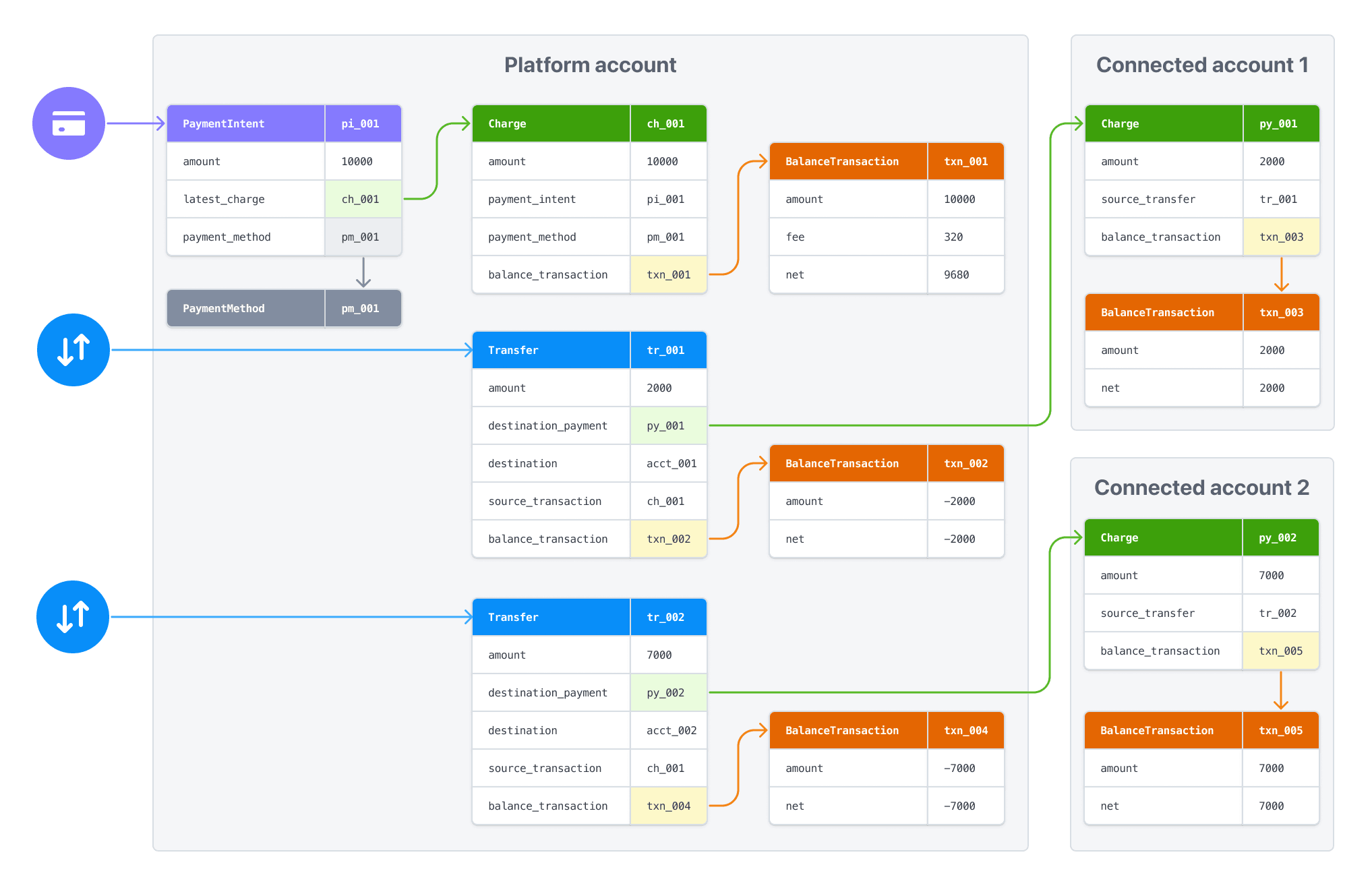
Create *separate charges and transfers* to transfer funds from one payment to multiple connected accounts, or when a specific user isn’t known at the time of the payment. The charge on your platform account is decoupled from the transfers to your connected accounts. With this charge type:
- You create a charge on your platform’s account and also transfer funds to your connected accounts. The payment appears as a charge on your account and there are also transfers to connected accounts (amount determined by you), which are withdrawn from your account balance.
- You can transfer funds to multiple connected accounts.
- Your account balance is debited for the cost of the Stripe fees, refunds, and chargebacks.
This charge type helps marketplaces split payments between multiple parties. For example, a restaurant delivery platform that splits payments between the restaurant and the deliverer.
> [Funds segregation](https://docs.stripe.com/connect/funds-segregation.md) is a private preview feature that keeps payment funds in a protected holding state before you transfer them to connected accounts. This prevents allocated funds from being used for unrelated platform operations. Contact your Stripe account manager to request access.
Stripe supports separate charges and transfers in the following regions:
- AE
- AT
- AU
- BE
- BG
- BR
- CA
- CH
- CY
- CZ
- DE
- DK
- EE
- ES
- FI
- FR
- GB
- GI
- GR
- HK
- HR
- HU
- IE
- IT
- JP
- LI
- LT
- LU
- LV
- MT
- MX
- MY
- NL
- NO
- NZ
- PL
- PT
- RO
- SE
- SG
- SI
- SK
- US
## Cross-border transfers
Stripe supports cross-border transfers on the payments balance between the United States, Canada, United Kingdom, EEA, and Switzerland. In other scenarios, your platform and any connected account must be in the same region. Attempting to transfer funds across unsupported borders or balances returns an error. See [Connect cross-border payouts](https://docs.stripe.com/connect/connect-cross-border-payouts.md) for supported funds flows between other regions.
You must only use transfers in combination with the permitted use cases for [charges](https://docs.stripe.com/connect/charges.md), [tops-ups](https://docs.stripe.com/connect/top-ups.md) and [fees](https://docs.stripe.com/connect/separate-charges-and-transfers.md#collect-fees). We recommend using separate charges and transfers only when you’re responsible for negative balances of your connected accounts.
Redirect to a Stripe-hosted payment page using [Stripe Checkout](https://docs.stripe.com/payments/checkout.md). See how this integration [compares to Stripe’s other integration types](https://docs.stripe.com/payments/online-payments.md#compare-features-and-availability).
#### Integration effort
Complexity: 2/5
#### Integration type
Redirect to Stripe-hosted payment page
#### UI customization
Limited customization
- 20 preset fonts
- 3 preset border radius
- Custom background and border color
- Custom logo
[Try it out](https://checkout.stripe.dev/)
First, [register](https://dashboard.stripe.com/register) for a Stripe account.
Use our official libraries to access the Stripe API from your application:
#### Ruby
```bash
# Available as a gem
sudo gem install stripe
```
```ruby
# If you use bundler, you can add this line to your Gemfile
gem 'stripe'
```
## Create a Checkout Session [Client-side] [Server-side]
A [Checkout Session](https://docs.stripe.com/api/checkout/sessions.md) controls what your customer sees in the payment form such as line items, the order amount and currency, and acceptable payment methods. Add a checkout button to your website that calls a server-side endpoint to create a Checkout Session.
```html
Checkout
```
On your server, create a Checkout Session and redirect your customer to the [URL](https://docs.stripe.com/api/checkout/sessions/object.md#checkout_session_object-url) returned in the response.
```curl
curl https://api.stripe.com/v1/checkout/sessions \
-u "<>:" \
-d "line_items[0][price_data][currency]=usd" \
-d "line_items[0][price_data][product_data][name]=Restaurant delivery service" \
-d "line_items[0][price_data][unit_amount]=10000" \
-d "line_items[0][quantity]=1" \
-d "payment_intent_data[transfer_group]=ORDER100" \
-d mode=payment \
--data-urlencode "success_url=https://example.com/success?session_id={CHECKOUT_SESSION_ID}"
```
- `line_items` - This attribute represents the items the customer is purchasing. The items are displayed in the Stripe-hosted checkout page.
- `payment_intent_data[transfer_group]` - Use a unique string as the `transfer_group` to identify objects that are associated with each other. When Stripe automatically creates a charge for a PaymentIntent with a `transfer_group` value, it assigns the same value to the charge’s `transfer_group`.
- `success_url` - Stripe redirects the customer to the success URL after they complete a payment and replaces the `{CHECKOUT_SESSION_ID}` string with the Checkout Session ID. Use this to retrieve the Checkout Session and inspect the status to decide what to show your customer. You can also append your own query parameters, which persist through the redirect process. See [customize redirect behavior with a Stripe-hosted page](https://docs.stripe.com/payments/checkout/custom-success-page.md) for more information.
(See full diagram at https://docs.stripe.com/connect/separate-charges-and-transfers)
```text
[customer] --> [100 USD Charge]
[100 USD Charge] --> [(70 USD) Transfer]
[(70 USD) Transfer] --> [70 USD Payment]
[(70 USD) Transfer] --> [(20 USD) Transfer]
[(20 USD) Transfer] --> [20 USD Payment]
[(20 USD) Transfer] --> [(3.20 USD) Stripe fees]
[(3.20 USD) Stripe fees] --> [stripe]
[(3.20 USD) Stripe fees] --> [6.80 USD net]
[platform]
[account]
[account]
```
## Handle post-payment events [Server-side]
Stripe sends a [checkout.session.completed](https://docs.stripe.com/api/events/types.md#event_types-checkout.session.completed) event when the payment completes. [Use a webhook to receive these events](https://docs.stripe.com/webhooks/quickstart.md) and run actions, like sending an order confirmation email to your customer, logging the sale in a database, or starting a shipping workflow.
Listen for these events rather than waiting on a callback from the client. On the client, the customer could close the browser window or quit the app before the callback executes. Some payment methods also take 2-14 days for payment confirmation. Setting up your integration to listen for asynchronous events enables you to accept multiple [payment methods](https://stripe.com/payments/payment-methods-guide) with a single integration.
Stripe recommends handling all of the following events when collecting payments with Checkout:
| Event | Description | Next steps |
| --- | --- | --- |
| [checkout.session.completed](https://docs.stripe.com/api/events/types.md#event_types-checkout.session.completed) | The customer has successfully authorized the payment by submitting the Checkout form. | Wait for the payment to succeed or fail. |
| [checkout.session.async_payment_succeeded](https://docs.stripe.com/api/events/types.md#event_types-checkout.session.async_payment_succeeded) | The customer’s payment succeeded. | Fulfill the purchased goods or services. |
| [checkout.session.async_payment_failed](https://docs.stripe.com/api/events/types.md#event_types-checkout.session.async_payment_failed) | The payment was declined, or failed for some other reason. | Contact the customer through email and request that they place a new order. |
These events all include the [Checkout Session](https://docs.stripe.com/api/checkout/sessions.md) object. After the payment succeeds, the underlying *PaymentIntent* (The Payment Intents API tracks the lifecycle of a customer checkout flow and triggers additional authentication steps when required by regulatory mandates, custom Radar fraud rules, or redirect-based payment methods) [status](https://docs.stripe.com/payments/paymentintents/lifecycle.md) changes from `processing` to `succeeded` or a failure status.
## Create a Transfer [Server-side]
On your server, send funds from your account to a connected account by creating a [Transfer](https://docs.stripe.com/api/transfers/create.md) and specifying the `transfer_group` used.
```curl
curl https://api.stripe.com/v1/transfers \
-u "<>:" \
-d amount=7000 \
-d currency=usd \
-d "destination={{CONNECTEDACCOUNT_ID}}" \
-d transfer_group=ORDER100
```
Transfer and charge amounts don’t have to match. You can split a single charge between multiple transfers or include multiple charges in a single transfer. The following example creates an additional transfer associated with the same `transfer_group`.
```curl
curl https://api.stripe.com/v1/transfers \
-u "<>:" \
-d amount=2000 \
-d currency=usd \
-d destination={{OTHER_CONNECTED_ACCOUNT_ID}} \
-d transfer_group=ORDER100
```
### Transfer options
You can assign any value to the `transfer_group` string, but it must represent a single business action. You can also make a transfer with neither an associated charge nor a `transfer_group`—for example, when you must pay a provider but there’s no associated customer payment.
> The `transfer_group` only identifies associated objects. It doesn’t affect any standard functionality. To prevent a transfer from executing before the funds from the associated charge are available, use the transfer’s `source_transaction` attribute.
By default, a transfer request fails when the amount exceeds the platform’s [available account balance](https://docs.stripe.com/connect/account-balances.md). Stripe doesn’t automatically retry failed transfer requests.
You can avoid failed transfer requests for transfers that are associated with charges. When you specify the associated charge [as the transfer’s source_transaction](https://docs.stripe.com/connect/separate-charges-and-transfers.md#transfer-availability), the transfer request automatically succeeds. However, we don’t execute the transfer until the funds from that charge are available in the platform account.
> If you use separate charges and transfers, take that into account when planning your *payout* (A payout is the transfer of funds to an external account, usually a bank account, in the form of a deposit) schedule. Automatic payouts can interfere with transfers that don’t have a defined `source_transaction`.
### Asynchronous payment methods
If you’re using *asynchronous payment methods* (Asynchronous payment methods can take up to several days to confirm whether the payment has been successful. During this time, the payment can't be guaranteed) (such as ACH Debit or SEPA Debit), wait for a [charge.succeeded](https://docs.stripe.com/api/events/types.md#event_types-charge.succeeded) event before creating a transfer. Unlike destination charges, Stripe doesn’t automatically reverse a transfer if the associated async payment fails. If you create a transfer and the payment subsequently fails, your platform’s balance is debited for the transfer amount. You must then manually [reverse the transfer](https://docs.stripe.com/connect/separate-charges-and-transfers.md#reverse-transfers) to recover the funds.
## Test the integration
#### Cards
| Card number | Scenario | How to test |
| --- | --- | --- |
| 4242424242424242 | The card payment succeeds and doesn’t require authentication. | Fill out the credit card form using the credit card number with any expiration, CVC, and postal code. |
| 4000002500003155 | The card payment requires *authentication* (Strong Customer Authentication (SCA) is a regulatory requirement in effect as of September 14, 2019, that impacts many European online payments. It requires customers to use two-factor authentication like 3D Secure to verify their purchase). | Fill out the credit card form using the credit card number with any expiration, CVC, and postal code. |
| 4000000000009995 | The card is declined with a decline code like `insufficient_funds`. | Fill out the credit card form using the credit card number with any expiration, CVC, and postal code. |
| 6205500000000000004 | The UnionPay card has a variable length of 13-19 digits. | Fill out the credit card form using the credit card number with any expiration, CVC, and postal code. |
#### Wallets
| Payment method | Scenario | How to test |
| --- | --- | --- |
| Alipay | Your customer successfully pays with a redirect-based and [immediate notification](https://docs.stripe.com/payments/payment-methods.md#payment-notification) payment method. | Choose any redirect-based payment method, fill out the required details, and confirm the payment. Then click **Complete test payment** on the redirect page. |
#### Bank redirects
| Payment method | Scenario | How to test |
| --- | --- | --- |
| Bancontact, EPS, iDEAL, and Przelewy24 | Your customer fails to authenticate on the redirect page for a redirect-based and immediate notification payment method. | Choose any redirect-based payment method, fill out the required details, and confirm the payment. Then click **Fail test payment** on the redirect page. |
| Pay by Bank | Your customer successfully pays with a redirect-based and [delayed notification](https://docs.stripe.com/payments/payment-methods.md#payment-notification) payment method. | Choose the payment method, fill out the required details, and confirm the payment. Then click **Complete test payment** on the redirect page. |
| Pay by Bank | Your customer fails to authenticate on the redirect page for a redirect-based and delayed notification payment method. | Choose the payment method, fill out the required details, and confirm the payment. Then click **Fail test payment** on the redirect page. |
| BLIK | BLIK payments fail in a variety of ways—immediate failures (for example, the code is expired or invalid), delayed errors (the bank declines) or timeouts (the customer didn’t respond in time). | Use email patterns to [simulate the different failures.](https://docs.stripe.com/payments/blik/accept-a-payment.md#simulate-failures) |
#### Bank debits
| Payment method | Scenario | How to test |
| --- | --- | --- |
| BECS Direct Debit | Your customer successfully pays with BECS Direct Debit. | Fill out the form using the account number `900123456` and BSB `000000`. The confirmed PaymentIntent initially transitions to `processing`, then transitions to the `succeeded` status 3 minutes later. |
| BECS Direct Debit | Your customer’s payment fails with an `account_closed` error code. | Fill out the form using the account number `111111113` and BSB `000000`. |
| SEPA Direct Debit | Your customer successfully pays with SEPA Direct Debit. | Fill out the form using the account number `AT321904300235473204`. The confirmed PaymentIntent initially transitions to processing, then transitions to the succeeded status three minutes later. |
| SEPA Direct Debit | Your customer’s payment intent status transitions from `processing` to `requires_payment_method`. | Fill out the form using the account number `AT861904300235473202`. |
#### Vouchers
| Payment method | Scenario | How to test |
| --- | --- | --- |
| Boleto, OXXO | Your customer pays with a Boleto or OXXO voucher. | Select Boleto or OXXO as the payment method and submit the payment. Close the dialog after it appears. |
See [Testing](https://docs.stripe.com/testing.md) for additional information to test your integration.
## Specify the settlement merchant
The settlement merchant is dependent on the [capabilities](https://docs.stripe.com/connect/account-capabilities.md) set on an account and how a charge is created. The settlement merchant determines whose information is used to make the charge. This includes the statement descriptor (either the platform’s or the connected account’s) that’s displayed on the customer’s credit card or bank statement for that charge.
Specifying the settlement merchant allows you to be more explicit about who to create charges for. For example, some platforms prefer to be the settlement merchant because the end customer interacts directly with their platform (such as on-demand platforms). However, some platforms have connected accounts that interact directly with end customers instead (such as a storefront on an e-commerce platform). In these scenarios, it might make more sense for the connected account to be the settlement merchant.
You can set the `on_behalf_of` parameter to the ID of a connected account to make that account the settlement merchant for the payment. When using `on_behalf_of`:
- Charges *settle* (When funds are available in your Stripe balance) in the connected account’s country and *settlement currency* (The settlement currency is the currency your bank account uses).
- The fee structure for the connected account’s country is used.
- The connected account’s statement descriptor is displayed on the customer’s credit card statement.
- If the connected account is in a different country than the platform, the connected account’s address and phone number are displayed on the customer’s credit card statement.
- The number of days that a [pending balance](https://docs.stripe.com/connect/account-balances.md) is held before being paid out depends on the [delay_days](https://docs.stripe.com/api/accounts/create.md#create_account-settings-payouts-schedule-delay_days) setting on the connected account.
> #### Accounts v2 API
>
> You can’t use the Accounts v2 API to manage payout settings. Use the Accounts v1 API.
If `on_behalf_of` is omitted, the platform is the business of record for the payment.
> The `on_behalf_of` parameter is supported only for connected accounts with a payments capability such as [card_payments](https://docs.stripe.com/connect/account-capabilities.md#card-payments). Accounts under the [recipient service agreement](https://docs.stripe.com/connect/service-agreement-types.md#recipient) can’t request `card_payments` or other payments capabilities.
```curl
curl https://api.stripe.com/v1/checkout/sessions \
-u "<>:" \
-d "line_items[0][price_data][currency]=usd" \
-d "line_items[0][price_data][product_data][name]=Restaurant delivery service" \
-d "line_items[0][price_data][unit_amount]=10000" \
-d "line_items[0][quantity]=1" \
-d "payment_intent_data[on_behalf_of]={{CONNECTEDACCOUNT_ID}}" \
-d "payment_intent_data[transfer_group]=ORDER100" \
-d mode=payment \
--data-urlencode "success_url=https://example.com/success"
```
## Collect fees
When using separate charges and transfers, the platform can collect fees on a charge by reducing the amount it transfers to the destination accounts. For example, consider a restaurant delivery service transaction that involves payments to the restaurant and to the driver:
1. The customer pays a 100 USD charge.
2. Stripe collects a 3.20 USD fee and adds the remaining 96.80 USD to the platform account’s pending balance.
3. The platform transfers 70 USD to the restaurant’s connected account and 20 USD to the driver’s connected account.
4. A platform fee of 6.80 USD remains in the platform account.
> #### Application fees with funds segregation
>
> [Funds segregation](https://docs.stripe.com/connect/funds-segregation.md#transfer-allocated-funds) is a private preview feature that allows you to debit application fees directly from allocated funds during transfer, providing clean accounting separation. Contact your Stripe account manager to request access.
To learn about processing payments in multiple currencies with Connect, see [working with multiple currencies](https://docs.stripe.com/connect/currencies.md).
## Transfer availability
The default behavior is to transfer funds from the platform account’s available balance. Attempting a transfer that exceeds the available balance fails with an error. To avoid this problem, when creating a transfer, tie it to an existing [charge](https://docs.stripe.com/api/charges.md) by specifying the charge ID as the `source_transaction` parameter. With a `source_transaction`, the transfer request returns success regardless of your available balance if the related charge hasn’t settled yet. However, the funds don’t become available in the destination account until the funds from the associated charge are available to transfer from the platform account.
> #### Transfers with funds segregation
>
> The private preview [funds segregation](https://docs.stripe.com/connect/funds-segregation.md#transfer-allocated-funds) feature requires the `source_transaction` parameter for transfers from allocated funds so they’re linked to their original payment.
If a transfer fails due to insufficient funds in your platform balance, adding funds doesn’t automatically retry the failed action—after adding funds, you must repeat any failed transfers or payouts.
If the source charge has a `transfer_group` value, Stripe assigns the same value to the transfer’s `transfer_group`. If it doesn’t, then Stripe generates a string in the format `group_` plus the associated PaymentIntent ID, for example: `group_pi_2NHDDD589O8KAxCG0179Du2s`. It assigns that string as the `transfer_group` for both the charge and the transfer.
> You must specify the `source_transaction` when you create a transfer. You can’t update that attribute later.
```curl
curl https://api.stripe.com/v1/transfers \
-u "<>:" \
-d amount=7000 \
-d currency=usd \
-d "source_transaction={{CHARGE_ID}}" \
-d "destination={{CONNECTEDACCOUNT_ID}}"
```
You can get the charge ID from the *PaymentIntent* (API object that represents your intent to collect payment from a customer, tracking charge attempts and payment state changes throughout the process):
- Get the PaymentIntent’s [latest_charge attribute](https://docs.stripe.com/api/payment_intents/object.md#payment_intent_object-latest_charge). This attribute is the ID of the most recent charge associated with the PaymentIntent.
- [Request a list of charges](https://docs.stripe.com/api/charges/list.md), specifying the `payment_intent` in the request. This method returns full data for all charges associated with the PaymentIntent.
When using this parameter:
- The amount of the transfer must not exceed the amount of the source charge
- You can create multiple transfers with the same `source_transaction`, as long as the sum of the transfers doesn’t exceed the source charge
- The transfer takes on the pending status of the associated charge: if the funds from the charge become available in N days, the payment that the destination Stripe account receives from the transfer also becomes available in N days
- Stripe automatically creates a `transfer_group` for you
- The currency of the balance transaction associated with the charge must match the currency of the transfer
*Asynchronous payment methods* (Asynchronous payment methods can take up to several days to confirm whether the payment has been successful. During this time, the payment can't be guaranteed), like *ACH* (Automated Clearing House (ACH) is a US financial network used for electronic payments and money transfers that doesn’t rely on paper checks, credit card networks, wire transfers, or cash), can fail after a subsequent transfer request is made. For these payments, avoid using `source_transaction`. Instead, wait until a [charge.succeeded](https://docs.stripe.com/api/events/types.md#event_types-charge.succeeded) event is triggered before transferring the funds. If you have to use `source_transaction` with these payments, you must implement functionality to manage payment failures.
When a payment used as a `source_transaction` fails, funds from your platform’s account balance are transferred to the connected account to cover the payment. To recover these funds, [reverse](https://docs.stripe.com/connect/separate-charges-and-transfers.md#reverse-transfers) the transfer associated with the failed `source_transaction`.
## Issue refunds
You can refund charges created on your platform using its *secret key* (Stripe APIs use your secret API key to authenticate requests from your server; you can use this key to make any API call on behalf of your account, such as creating a charge or performing a refund). However, refunding a charge has no impact on any associated transfers. It’s up to your platform to reconcile any amount owed back to it by reducing subsequent transfer amounts or by [reversing transfers](https://docs.stripe.com/connect/separate-charges-and-transfers.md#reverse-transfers).
> #### Refunds with funds segregation
>
> The private preview [funds segregation](https://docs.stripe.com/connect/funds-segregation.md#handle-refunds-and-disputes) feature uses allocated funds for refunds before debiting your platform’s payments balance, providing clean accounting separation.
```curl
curl https://api.stripe.com/v1/refunds \
-u "<>:" \
-d "charge={{CHARGE_ID}}"
```
## Reverse transfers
Connect supports the ability to [reverse transfers](https://docs.stripe.com/api.md#create_transfer_reversal) made to connected accounts, either entirely or partially (by setting an `amount` value). Use transfer reversals only for refunds or disputes related to the charge, or to correct errors in the transfer.
```curl
curl https://api.stripe.com/v1/transfers/{{TRANSFER_ID}}/reversals \
-u "<>:" \
-d amount=7000
```
Transfer reversals add the specified (or entire) amount back to the platform’s available balance, reducing the connected account’s available balance accordingly. It’s only possible to reverse a transfer if the connected account’s available balance is greater than the reversal amount or has [connected reserves](https://docs.stripe.com/connect/account-balances.md#understanding-connected-reserve-balances) enabled.
If the transfer reversal requires a currency conversion, and the reversal amount would result in a zero balance after the conversion, it returns an error.
Disabling refunds for a connected account won’t block the ability to process transfer reversals.
## See also
- [Working with multiple currencies](https://docs.stripe.com/connect/currencies.md)
- [Statement descriptors with Connect](https://docs.stripe.com/connect/statement-descriptors.md)
- [Understanding Connect account balances](https://docs.stripe.com/connect/account-balances.md)
- [Disputes on Connect platforms](https://docs.stripe.com/connect/disputes.md)